.webp)
Do some HONOR TWS earbuds lack a pairing button?This article shows you how to connect the earbuds to your device and reset them.
Quickly pair HONOR devices

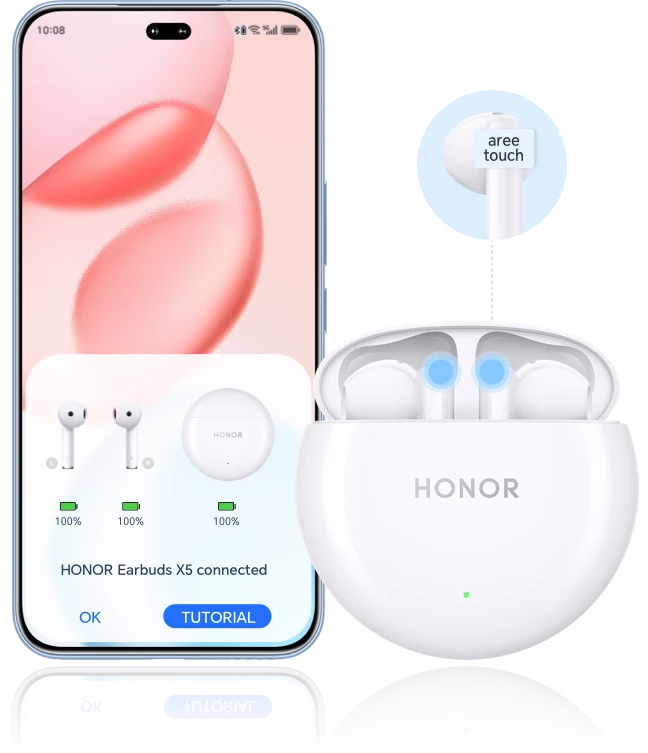
Place the earbuds in the charging case. Keep the lid open. Turn on Bluetooth on your phone, then press and hold the touch sensors on both earbuds for 3 seconds until the white light at the bottom of the charging case starts flashing, which indicates that the earbuds have entered pairing mode. A pairing request pop-up will appear on your device screen; tap Connect.
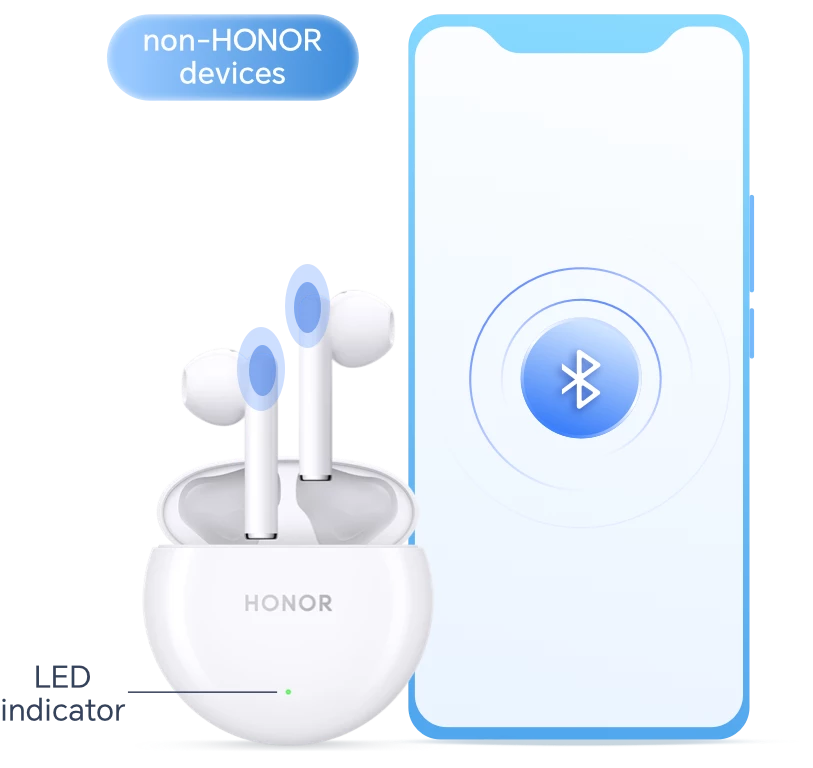
On non-HONOR devices simply search for the earbuds and connect
Press and hold the touch areas on both the left and right earbuds simultaneously for 3 seconds until the white light at the bottom of the charging case flashes to enter pairing mode. Open your device’s Settings > Bluetooth, enable Bluetooth, then select your earbuds from the list to pair.
Simply press and hold to restore factory settings
If your earbuds require reconnection, resetting, or other operations, follow the steps below to perform a factory reset.
Place the earbuds in the charging case with the lid open, then simultaneously press and hold the touch controls on both earbuds for 10 seconds until the red light at the bottom of the charging case flashes, indicating that the factory reset is complete. When the white light flashes again, you can re-pair the earbuds.
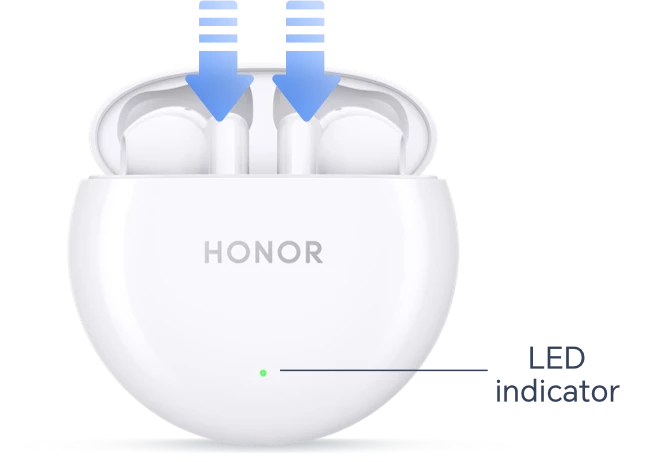
*The following instructions apply to HONOR Earbuds X6; procedures may vary by model, so please follow the prompts on your device.
Quick pairing and reset—enjoy comfortable sound quality
Do some HONOR TWS earbuds lack a pairing button?This article shows you how to connect the earbuds to your device and reset them.
Quickly pair HONOR devices
Place the earbuds in the charging case. Keep the lid open. Turn on Bluetooth on your phone, then press and hold the touch sensors on both earbuds for 3 seconds until the white light at the bottom of the charging case starts flashing, which indicates that the earbuds have entered pairing mode. A pairing request pop-up will appear on your device screen; tap Connect.
On non-HONOR devices simply search for the earbuds and connect
Press and hold the touch areas on both the left and right earbuds simultaneously for 3 seconds until the white light at the bottom of the charging case flashes to enter pairing mode. Open your device’s Settings > Bluetooth, enable Bluetooth, then select your earbuds from the list to pair.
Simply press and hold to restore factory settings
If your earbuds require reconnection, resetting, or other operations, follow the steps below to perform a factory reset.
Place the earbuds in the charging case with the lid open, then simultaneously press and hold the touch controls on both earbuds for 10 seconds until the red light at the bottom of the charging case flashes, indicating that the factory reset is complete. When the white light flashes again, you can re-pair the earbuds.
*The following instructions apply to HONOR Earbuds X6; procedures may vary by model, so please follow the prompts on your device.
Quick pairing and reset—enjoy comfortable sound quality