

NFC (Near Field Communication) technology
make your phone a contactless card,
and bring you unexpected convenience.
make your phone a contactless card,
and bring you unexpected convenience.
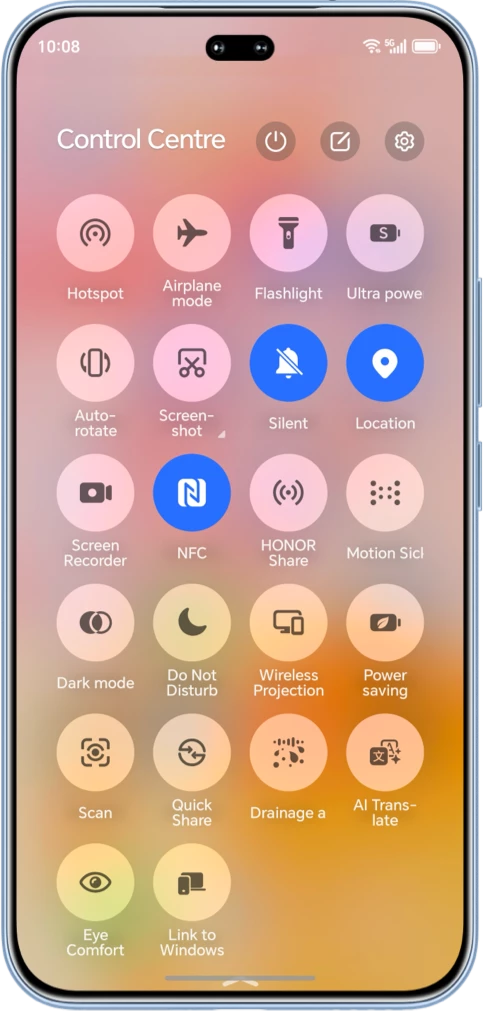
Here are two ways to enable NFC in your HONOR phone


Swipe down from the status bar to open the notification panel and enable the NFC icon.
Long-press the icon to access the NFC settings interface.

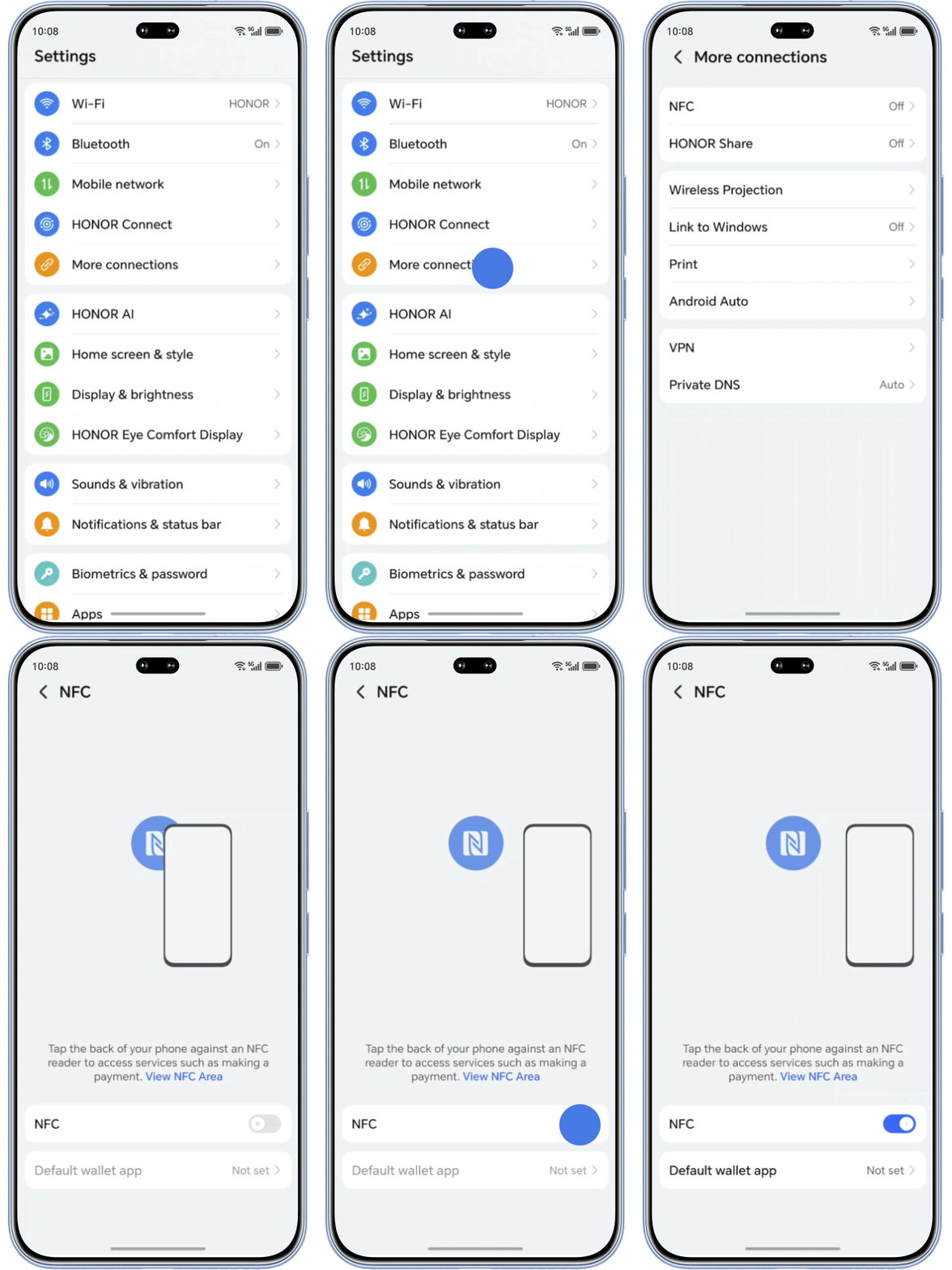
Go to Settings > More Connections > NFC, turn on the NFC function and choose the Google Wallet as the default wallet app.
How to use NFC to make payment?
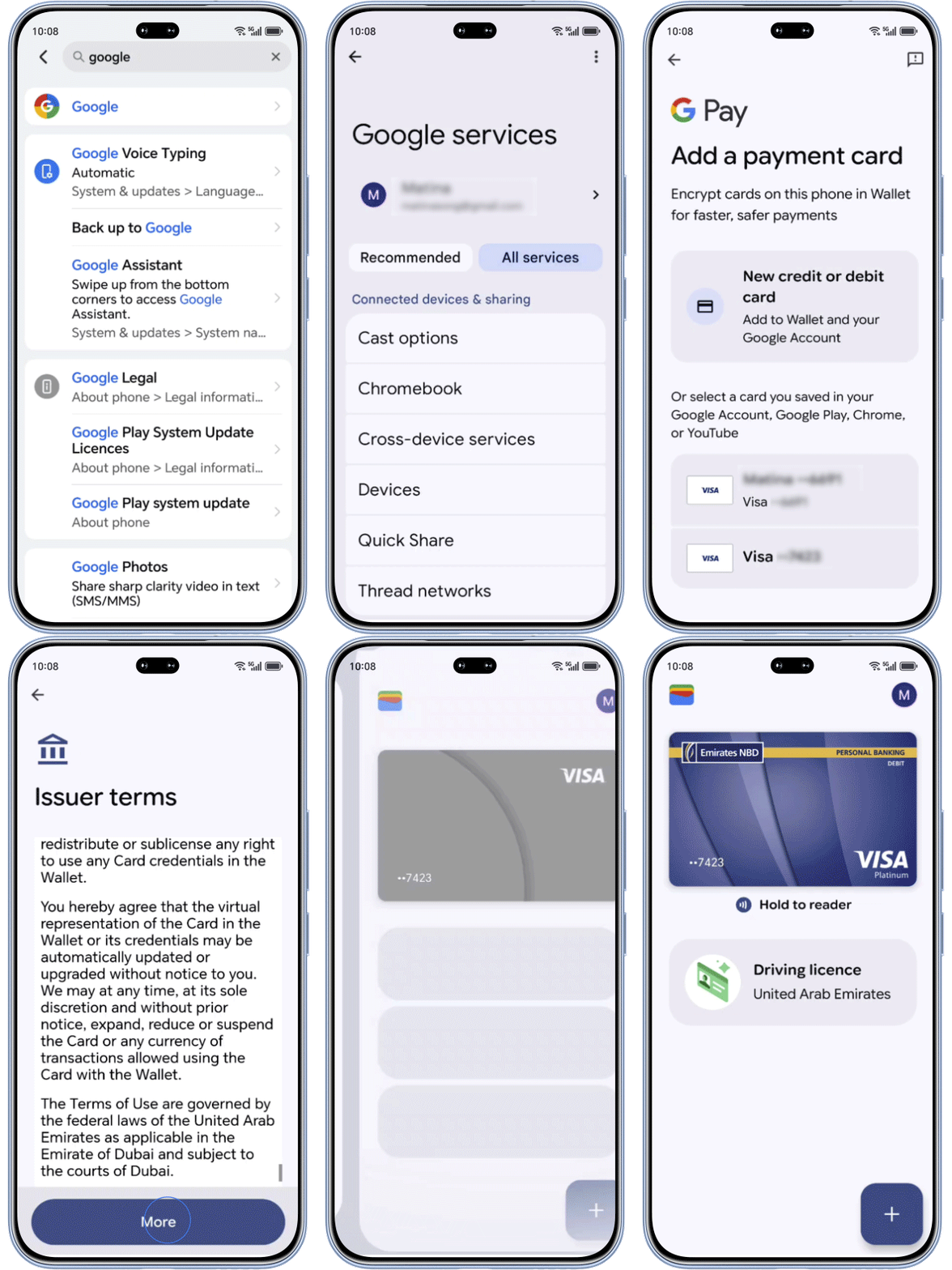
Go to Settings > Google > Google servcies > Google Pay, enter a valid card information, follow the notificaiton to verify your card.
Place the NFC area of your phone close to the card reader's sensing area, and tap to pay.
Tips:
1: It is recommended to turn off NFC when it is not in use.
2: Metal phone cases may block NFC communication, try removing it before tapping.
3: When using NFC, ensure that the sensing area of your phone is placed flat above the POS machine.
The location of the NFC sensing area may vary between HONOR phone models; please refer to your specific device for accurate placement.
1: It is recommended to turn off NFC when it is not in use.
2: Metal phone cases may block NFC communication, try removing it before tapping.
3: When using NFC, ensure that the sensing area of your phone is placed flat above the POS machine.
The location of the NFC sensing area may vary between HONOR phone models; please refer to your specific device for accurate placement.
Enable NFC in your HONOR mobiles,
just tap and go.
just tap and go.
Scan the QR code below to contact us immediately.

NFC (Near Field Communication) technology
make your phone a contactless card,
and bring you unexpected convenience.
make your phone a contactless card,
and bring you unexpected convenience.
Here are two ways to enable NFC in your HONOR phone
Swipe down from the status bar to open the notification panel and enable the NFC icon.
Long-press the icon to access the NFC settings interface.
Go to Settings > More Connections > NFC, turn on the NFC function and choose the Google Wallet as the default wallet app.
How to use NFC to make payment?
Go to Settings > Google > Google servcies > Google Pay, enter a valid card information, follow the notificaiton to verify your card.
Place the NFC area of your phone close to the card reader's sensing area, and tap to pay.
Tips:
1: It is recommended to turn off NFC when it is not in use.
2: Metal phone cases may block NFC communication, try removing it before tapping.
3: When using NFC, ensure that the sensing area of your phone is placed flat above the POS machine.
The location of the NFC sensing area may vary between HONOR phone models; please refer to your specific device for accurate placement.
1: It is recommended to turn off NFC when it is not in use.
2: Metal phone cases may block NFC communication, try removing it before tapping.
3: When using NFC, ensure that the sensing area of your phone is placed flat above the POS machine.
The location of the NFC sensing area may vary between HONOR phone models; please refer to your specific device for accurate placement.
Enable NFC in your HONOR mobiles,
just tap and go.
just tap and go.
Scan the QR code below to contact us immediately.